These are useful starting points, but they do not establish licensing, verifiable randomness or dependable withdrawals. This review explains the product, the costs and conditions to clarify, and the checks that matter before transferring anything. Chance-based play is 18+ and carries a house edge; you can lose the items or balance you commit.
The verdict: a defined CS2 product, not a blanket safety endorsement
Upgrader has a straightforward documented purpose: upgrading CS2 items. Its additional Battle mode provides a competitive format, while Steam authentication connects access to an existing gaming identity. For someone assessing a skin-upgrading service, that is a clearer proposition than assuming it is a general marketplace, a cash-out service or a case-opening platform.
The cautious conclusion is that Upgrader identifies an operator and describes a defined category of service, but those facts alone cannot settle whether it is suitable for your circumstances. Fees, outcome verification, withdrawal conditions and local authorisation need separate scrutiny. A polished interface, successful Steam sign-in or visible company name cannot answer all of those questions.
- Product
- CS2 skin upgrader
- Documented modes
- Upgrade and 2-player Battles
- Account access
- Steam login
- Named operator
- SYNAPICE LTD, company number HE 492848
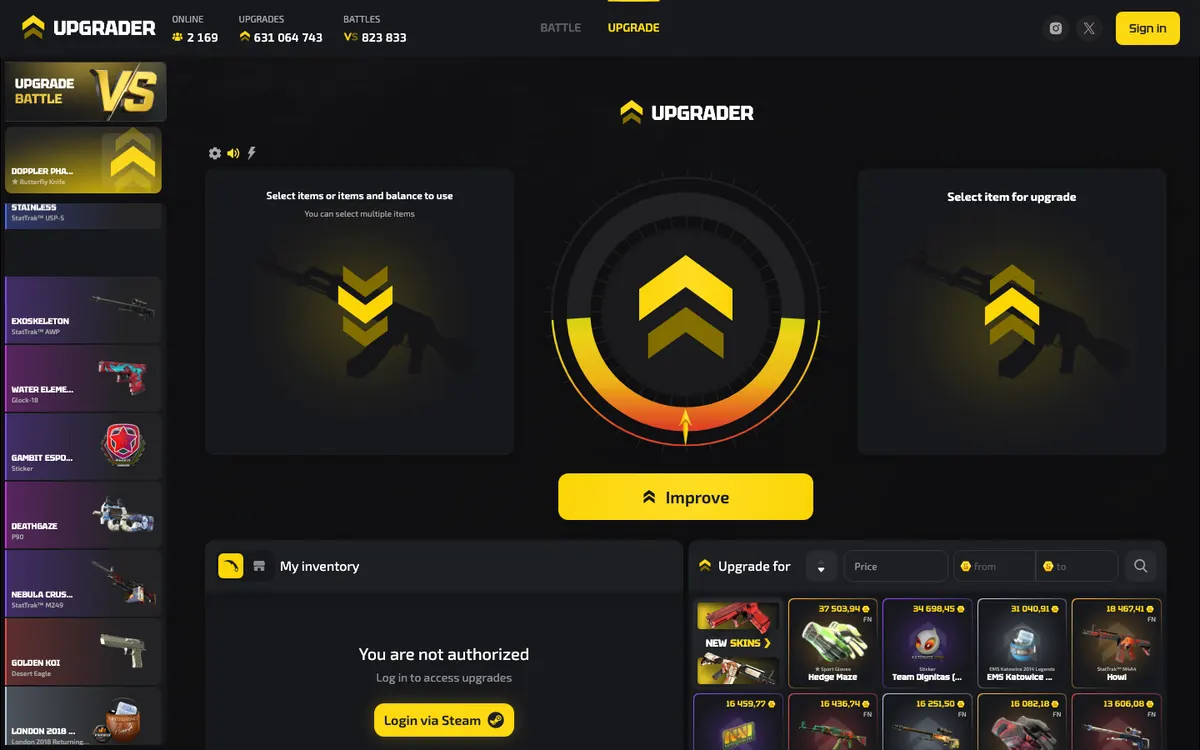
What Upgrader actually offers
The distinction between an upgrader and a shop matters. In a direct purchase, you choose a known item and accept its price. In a typical skin-upgrade game, you commit value for a chance at a more valuable outcome, with the possibility of losing the committed value. That is a general explanation of the category, not a substitute for Upgrader’s current round rules.
| Feature | What is documented | What to check before use |
|---|---|---|
| Upgrade | The site describes upgrading CS2 items. | The stake, target item, success probability and failure outcome. |
| Battles | 2-player battles can be created, joined or watched. | Entry commitment, winner calculation, ties and cancellation rules. |
| Steam login | Steam sign-in provides access to upgrades. | That authentication occurs on the genuine Steam service. |
| Item operations | The terms cover receipt, storage, exchange, withdrawal and automatic sale of items. | Which operations are available for your account and their conditions. |
Being able to watch Battles does not explain how winners are selected, and a mode name does not disclose its mathematics. Before joining, the interface should make the commitment and resolution understandable. If you cannot explain what you lose, what you might receive and how the result is determined, the mode is not sufficiently clear for an informed decision. See the game modes guide for the distinctions to examine.
For Battles specifically, distinguish a spectator view from the terms accepted by participants. A visible winning result does not tell you whether entry commitments were equal, how rewards were allocated or what happens after a connection problem. Before joining any competitive chance-based format, locate those rules and check when participation becomes irreversible. These are general evaluation questions, not claims that Upgrader uses a particular settlement system. Watching other people play is not evidence that the next outcome will resemble theirs.
CS2 support does not imply a multi-game marketplace
CS2 is the documented focus. Do not assume support for Dota 2, Rust or TF2 items, or infer that a conventional buy-and-sell marketplace exists because the terms mention exchanges and automatic sales. Legal terms can describe operations without establishing a standalone shopping feature. If your goal is obtaining a particular skin rather than accepting a chance-based outcome, first establish whether a direct purchase route is actually offered.
Is Upgrader legit? Separate identity, permission and performance
Upgrader’s terms identify SYNAPICE LTD, registered in Limassol, Cyprus, as the operator. Its privacy policy also identifies that company as the data controller and payment data controller, including for payment-related fraud and money-laundering analysis. These disclosures identify who claims responsibility for the service and its data processing. They are not a security audit, a payout guarantee or evidence of gambling authorisation.
A useful legitimacy assessment separates identity, legal permission, account security and transaction performance. A company can be identifiable without being authorised everywhere. A genuine Steam login can protect the authentication step without proving that a later item transfer is appropriate. Similarly, a successful transaction does not establish that every future withdrawal will work under every condition.
In Australia, the Interactive Gambling Act prohibits online casino and slot services to Australians and their advertising. ACMA administers the Act. This is jurisdiction-specific context, not a finding about Upgrader’s licence status. Check the relevant regulator’s information rather than treating corporate registration as a substitute.
When checking an authorisation claim, match the legal entity, the service address and the permitted activity rather than stopping at a familiar company name. A company record and a gambling licence answer different questions. Also distinguish permission to operate from protection for a particular customer dispute. If the applicable authority or permitted territory is unclear, resolve that before transferring value. A site being reachable from your location does not establish that you are entitled to use every feature.
Fees and value: assess the whole transaction
Upgrader’s published product details do not specify a complete fee schedule or a numerical house edge. Consequently, there is no sound basis for describing it as cheap, commission-free or better value than another service. Separate visible charges from the less obvious cost of item valuation and the mathematical disadvantage of chance-based play. An interface can show no standalone fee while the overall transaction remains costly.
| Cost component | Why it matters | What to inspect |
|---|---|---|
| Top-up conversion | The amount paid and internal balance credited may not be equivalent. | Final payment total, credited balance and any conversion terms. |
| Input-item valuation | A platform valuation determines how much purchasing or playing power an item provides. | The exact item attributes and the displayed credit before confirmation. |
| Outcome pricing | An attractive target price does not establish favourable odds. | Target valuation alongside the stated success probability. |
| Withdrawal cost | Charges or conditions can change the value actually received. | Any deduction, eligibility condition or minimum shown before withdrawal. |
| Automatic sale | Conversion into internal balance is different from receiving an item. | When conversion happens and how the sale value is calculated. |
Skin valuation needs like-for-like comparisons. For CS2 items, wear describes cosmetic condition, while float is a numerical representation associated with that condition. Pattern, special attributes and item identity can also matter to buyers. Rarity is a classification, not a promise of a particular sale price. These are general skin-market concepts; they do not establish how Upgrader calculates its own valuations.
Do not use a Steam Community Market listing as if it were a cash withdrawal quote. Steam’s market operates with Steam Wallet funds and displays transaction fee information. A wallet-denominated market price, an external sale price and a platform’s internal credit are different reference points. The fees guide explains how to compare the complete route without inventing a brand-specific commission.
Compare quotes at the point when you would actually accept them. A remembered price or an old screenshot may not describe the current transaction. Record the item identity, the value assigned to it, the credit offered and any stated deductions together. If the quote changes before confirmation, reassess the whole exchange rather than focusing only on the most attractive figure. This also makes a later pricing question easier to explain: you can identify the quote accepted, not merely the price you expected.
Provably fair: require a reproducible result
Upgrader’s published feature descriptions do not specify a provably-fair algorithm, seed process or verification procedure. It would therefore be misleading to label its outcomes independently verifiable on that basis. A moving animation, a result history or a probability displayed beside an item is not, by itself, cryptographic evidence. Each can describe or present an outcome without allowing you to reproduce its calculation.
In general, a provably-fair system uses cryptographic commitments and disclosed inputs so a user can check whether a completed result follows the stated method. Implementations differ. The following is a verification checklist, not a description of an Upgrader feature.
- Find the commitmentLook for an explanation of what the operator commits to before the outcome, commonly a hash of a secret server seed. A hash shown only after play does not demonstrate a prior commitment.
- Identify every inputThe rules should explain the server input, any user-controlled seed and the round identifier or nonce. You need to know which inputs belong to the specific result being checked.
- Check the revealed dataAfter the relevant seed is revealed, its hash should match the earlier commitment. The published algorithm should explain how the inputs generate the result and how that result maps to a win or loss.
- Reproduce the outcomeUse the disclosed method to check the completed round, preferably with an independent implementation. A verifier that merely repeats the platform’s verdict provides less assurance than an inspectable calculation.
Even a correctly verified outcome does not establish good value. Provably fair concerns whether the result follows a committed calculation; the house edge concerns the relationship between stakes, probabilities and rewards. It also says nothing about licensing, personal-data handling or whether an item withdrawal will be fulfilled. These are separate tests, and passing one does not resolve the others.
Likewise, a streak of wins or losses cannot replace a verification method. Random outcomes can form patterns that look meaningful without predicting what happens next. An individual result may be reproducible while still being unfavourable to the player. The useful question is whether the disclosed inputs and rules produce that result, not whether the animation looked plausible or whether previous rounds felt balanced.
If a live game shows a fairness link, inspect it before committing value rather than assuming the label answers everything. The provably fair guide explains the terminology and what a useful verification record should contain.
Payments and withdrawals: internal balance is not cash in hand
Upgrader’s terms cover top-ups to an internal balance, item withdrawals and automatic sales. They also state that the operator does not accept user funds as a deposit, accrue interest on the balance or provide safekeeping of funds. In practical terms, do not treat an internal balance as a bank account or assume that it carries the protections or withdrawal rights associated with one.
| Term | Documented position | Do not assume |
|---|---|---|
| Top-up | The terms describe adding to an internal balance. | That cards, bank transfers or any particular cryptocurrency are supported. |
| Internal balance | The operator disclaims deposit-taking, interest and safekeeping. | That balance is equivalent to a protected cash deposit. |
| Item withdrawal | Withdrawal of items falls within the terms. | That every displayed item is immediately deliverable. |
| Automatic sale | Automatic sale of items is covered. | That this means an external cash payout or a user-controlled marketplace listing. |
| Processing | The published product descriptions do not specify processing times or method limits. | That a completed top-up predicts the timing of a later withdrawal. |
Before paying, follow the entire proposed route: payment source, balance credited, permitted use and eventual destination of the value. Confirm whether the end result is an item, internal credit or an external payment. A service can make adding value straightforward while applying different conditions to taking value out. Do not infer those conditions from a payment logo or the availability of a top-up control.
Specific payment rails, minimums, maximums and payout times are not specified in Upgrader’s published product descriptions. Check the live transaction terms before proceeding and retain the confirmation. If identity checks might apply, understand the requirement and privacy terms before sending documents; the privacy policy’s payment-data provisions do not, by themselves, establish a particular verification threshold. See deposits and withdrawals for the practical checks.
If a payment appears successful but the balance has not changed, avoid immediately submitting it again. First distinguish the payment provider’s status from the platform’s crediting status and check your transaction history. Save the reference, destination and confirmation message without exposing sensitive payment details. Repeating an unclear payment can create a separate transaction rather than resolve the original problem. This is general troubleshooting advice, not an Upgrader processing-time estimate or a promise about how a disputed payment will be handled.
Steam trading safety: inspect the transfer, not just the website
Upgrader’s official service is at https://upgrader.pro/en, and Steam login is documented. For any third-party skin service, authentication and item delivery are separate actions. Signing in establishes an account connection; accepting a trade authorises movement of the items shown in that offer. Treat every trade confirmation as a fresh decision rather than a routine continuation of an earlier website interaction.
- Check the destination address before signing in. Familiar branding or an advertisement is not enough to establish that a page is genuine.
- Enter Steam credentials only through the genuine Steam authentication service, not into a third-party form claiming to duplicate it.
- Protect Steam Guard codes, recovery information and session details. Do not share them with someone offering payment or withdrawal assistance.
- Compare the offered items and the counterparty with the transaction you intended. A familiar avatar or display name is not reliable identification.
- Read the mobile confirmation itself. Stop if the contents differ from what you expected, even if an earlier screen looked correct.
- Keep transaction references and screenshots, but remove sensitive account details before sharing evidence with support.
A Steam trade link and a Steam password serve different purposes. In general, a trade link lets another party address an offer to your account; it does not replace your review or authorise acceptance. If a service requests a trade link, obtain it through Steam’s own trade settings and check which account it belongs to. Do not interpret a request for that link as permission to disclose authentication codes, approve an unrelated offer or install software supplied by a stranger.
Understand holds before calling a withdrawal missing
Steam explains that a trade hold delays delivery of items and gives owners of compromised accounts an opportunity to cancel fraudulent trades. Its Mobile Authenticator provides additional authentication for trade and market confirmations. These are Steam mechanisms, not a published Upgrader delivery promise. Check the status inside Steam and read the restriction actually displayed rather than relying on a generic estimate.
A trade offer is a proposed exchange with items selected for each side. Reviewing those contents matters more than trusting a message that calls the transfer a verification step. Valve has also explained why it stopped manually restoring items lost through successful trades or market sales. Do not plan around recovery after a mistaken confirmation. The trade safety guide covers prevention and account checks in more detail.
Treat document requests as a separate privacy decision
Account authentication, payment review and identity verification are different processes. Upgrader’s privacy policy identifies a controller for payment-related data, but that disclosure does not explain every document request you might encounter. Before providing personal records, establish who is requesting them, why they are needed and which submission route is authorised. Do not send documents to an unsolicited chat account merely because it knows your username. Equally, do not assume that withholding a required check leaves every account function available; clarify the applicable terms first.
Practical decision paths when something is unclear
- You can sign in, but cannot see an itemCheck the correct Steam account, the item’s trade eligibility and any inventory-related message first. A successful login does not prove that every inventory item can be used. Do not transfer a replacement item merely to troubleshoot an unexplained absence.
- A withdrawal appears pendingDistinguish a website request from a Steam offer, an accepted trade and completed delivery. Record the transaction reference and check Steam for a hold or restriction. A missing offer and an accepted-but-held trade are different problems requiring different evidence.
- Someone asks for another transfer to release valuePause rather than treating the request as routine. Compare it with the written terms and use a contact route reached from the service itself. Unsolicited messages, copied support profiles and requests for authentication secrets should not determine your next action.
- A charge or conversion is unclearDo not confirm the transaction until the total paid, credit received and withdrawal implications are understandable. Preserve the displayed quote if clarification is needed. A vague explanation is not a reason to accept an unknown cost.
- A result seems wrongSave the round identifier, displayed probability, stake details and any available fairness inputs. Ask for the applicable rule and calculation rather than relying on the animation. Do not play additional rounds to test whether the system will compensate for the disputed outcome.
For any dispute, a concise timeline is more useful than repeated messages: what you intended, what you confirmed, what the account shows and what Steam shows. Keep payment references private except when submitting them through an appropriate support channel. The support guide explains what to prepare without assuming a response time or a particular contact method.
Who the product fits—and who should choose a different route
In product terms, Upgrader aligns with an adult specifically seeking chance-based CS2 upgrades or the documented Battle format. That is not a recommendation to participate. Suitability still depends on local permission, understandable rules, acceptable costs and the ability to lose the entire committed value without affecting essential spending. The operator’s terms allow territorial, age-related and other restrictions, so access alone does not establish eligibility.
- If you want a particular skin, compare a known-price purchase route rather than treating an upgrade as a substitute for buying.
- If you need a predictable cash payout, do not assume that item withdrawal or automatic sale provides one.
- If you require independently reproducible outcomes, do not proceed without an understandable verification method.
- If you cannot establish local authorisation or account eligibility, stop before transferring value.
- If you are trying to recover previous losses, take a break rather than increasing the commitment or changing modes.
Set a spending boundary before opening any chance-based mode and keep it separate from essential expenses. Stop when the boundary is reached, not when an outcome feels satisfactory. Signs that play is becoming harmful include hiding spending, repeatedly revising limits and feeling compelled to continue after losses. Use the responsible gambling guide for practical safeguards and help-seeking information. In Australia, Gambling Help Online is available on 1800 858 858. Do not assume Upgrader offers a particular limit-setting or exclusion tool.
Competitive presentation can also make stopping feel like abandoning a contest rather than ending a spending decision. Decide your boundaries independently of another participant’s behaviour, a spectator feed or a previous result. If the format makes it difficult to pause and review the commitment calmly, stepping away is a valid decision. An entertaining presentation does not reduce the value at stake.
Before you decide: the short checklist
- Identify the product correctly: documented CS2 upgrades and 2-player Battles, not an assumed multi-game marketplace.
- Check legal eligibility independently of the Steam sign-in process.
- Read the commitment, probability, outcome and cancellation rules before joining a mode.
- Resolve fees, item valuations, withdrawal conditions and the destination of any resulting value.
- Require actual verification data before treating an outcome as provably fair.
- Inspect every Steam trade and stop if the counterparty or contents differ from your intention.
Upgrader review FAQ
No matching questions found.
Is Upgrader legit or a scam?
Is Upgrader affiliated with Steam or Valve?
Is Upgrader provably fair?
What fees does Upgrader charge?
Which deposit and withdrawal methods does Upgrader support?
How long do Upgrader withdrawals take?
Does Upgrader support games other than CS2?
Can I use Upgrader just to buy a skin?
This independent guide is for informational purposes and is not affiliated with Upgrader.