Upgrader offers Steam sign-in, Upgrade and Battles, and its agreement covers Internal Balance, Item Withdrawal and Automatic Sale. Those documented functions do not, by themselves, establish an instant cash-buying service or a marketplace where you list skins for buyers. Cash-sale fees, payout methods and cash-arrival times are not specified in the documented product information. Start by separating a cash payout from platform balance, an item exchange and a Steam Community Market sale.
What Upgrader documents—and what sellers still need
Upgrader's documented strengths are access through Steam and its Upgrade and Battle modes. Its agreement also addresses the receipt, storage, use, exchange, Withdrawal and Automatic Sale of Items. For someone looking to sell, the important question is not whether the word “sale” appears, but what that operation does: which items it affects, what value you receive, where that value goes and whether you can withdraw it as money. Do not infer a cash-selling workflow from an item-management term.
- Account access
- Steam sign-in is documented for access to upgrades.
- Documented modes
- Upgrade and Battles.
- Item operations
- The agreement covers Item Withdrawal and Automatic Sale, alongside other platform operations.
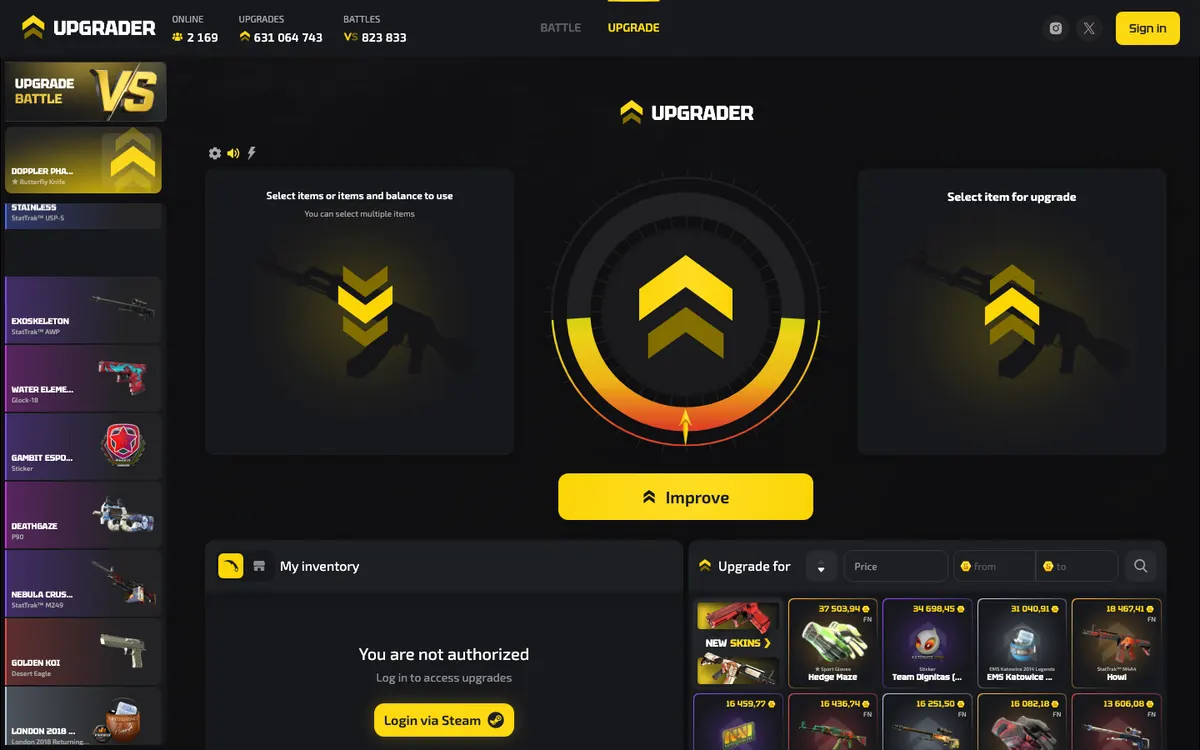
A recognisable interface or successful Steam sign-in is not evidence that a particular payout route exists. Before committing an item, look for a transaction-specific explanation of the destination of the proceeds, the final amount, any deductions and the settlement conditions. Upgrader's published product and agreement details do not specify an instant cash-sale quote system, a seller-listing workflow or a cash payout schedule. That is different from saying every sale-related operation is unavailable.
Choose the outcome you actually want
“Sell my skins” can describe several transactions with very different results. Decide where you want the value to end up before comparing prices. If your goal is spendable money outside a platform, receiving an internal balance is not an equivalent outcome. If you want a different skin, an item exchange may meet your needs, but it still should not be described as a cash payout.
| Your intended result | What the transaction must deliver | What to check |
|---|---|---|
| Money outside the platform | A cash payout through an explicitly supported method | The payout destination, final proceeds, eligibility and settlement conditions; Upgrader does not specify these cash-sale details. |
| Platform spending balance | A credit usable under that platform's balance rules | Whether the credit is withdrawable, restricted to platform activity or subject to additional conditions. |
| A different skin | An item exchange followed by delivery of the selected item | The exact item, its attributes, availability and Steam trade status. |
| Steam Wallet funds | A completed Steam Community Market sale | The amount you receive after the displayed fees; Wallet proceeds are not a bank payout. |
The Steam Community Market explicitly operates with Steam Wallet funds and displays transaction-fee information. That is a general Steam distinction, not an Upgrader payment rule. Similarly, a platform's displayed item valuation may be a reference for its own operations rather than an offer to pay money into your bank account. Compare destinations as well as headline values. A larger balance figure can be less useful to you than a smaller cash offer if cash is your actual objective.
Why “Automatic Sale” does not establish an instant cashout
Automatic Sale appears among the operations covered by Upgrader's agreement. The term alone does not identify the buyer, the trigger for the sale, the valuation method or the destination of the proceeds. Nor does it establish that you can choose any inventory item and receive a cash offer. Before relying on such an operation, find its specific conditions and transaction preview. Ask whether it concerns an item already held on the platform, whether the resulting value becomes Internal Balance and whether any further action is necessary. Do not substitute assumptions for those answers.
Treat Internal Balance according to its actual purpose
Upgrader's agreement covers Top-Ups to an Internal Balance, while also stating that the operator does not accept user funds as a deposit, accrue interest on the balance or provide safekeeping of funds. Do not treat the balance as a savings account or assume that its displayed value is withdrawable money. The useful question is what the terms permit you to do with that balance. Likewise, Item Withdrawal describes an item-related operation; its name is not evidence of a bank, card or cryptocurrency payout.
Instant sale versus listing: compare control and certainty
Across skin markets, an instant sale generally means accepting an available buyer's quote, while a listing means offering an item and waiting for a buyer. These are general market models, not confirmed Upgrader selling features. Understanding the difference helps you evaluate any sale interface you encounter without mistaking a quick valuation for a completed transaction.
| Decision point | Instant-sale model | Listing model |
|---|---|---|
| Price setting | You accept or reject a quote from an available buyer. | You choose an asking price within the marketplace's rules. |
| Finding a buyer | The quote comes from a buyer prepared to transact under stated conditions. | A buyer must choose your listing; publication alone is not a sale. |
| Timing uncertainty | Quote acceptance can be quick, but transfer and payout remain separate stages. | The wait for a buyer is added to transfer and payout processing. |
| Price trade-off | Convenience may be reflected in the offered price rather than a separate fee. | An ambitious asking price may leave the item unsold. |
| What to compare | The final proceeds and payout conditions attached to the quote. | Likely proceeds after selling costs, plus whether the asking price attracts buyers. |
A high listing price is not evidence that another seller received that amount. Equally, a low instant quote is not automatically a hidden commission: it may reflect the buyer's pricing approach or demand for that item. Compare actual offers for the same skin and payout destination. On Upgrader, do not assume either model is available unless the current interface and applicable terms explicitly explain it. The broader workflow is covered in how Upgrader works.
Compare the exact item, not just its name
For CS2 items, a name alone may hide meaningful differences. Wear describes an exterior-condition category, while float provides a more precise measure associated with that wear. Pattern, StatTrak status and applied stickers can also affect how a buyer values a particular item. Rarity is not the same as demand: an uncommon item still needs a willing buyer. These are general valuation concepts, not a claim that Upgrader pays premiums for any particular attribute.
When comparing a quote with market listings, match the item's relevant attributes and distinguish asking prices from completed transactions wherever that information is available. A broad inventory estimate may not account for unusual characteristics. If a skin has a feature you consider valuable, establish whether the buyer recognises it before accepting the offer. Once you knowingly accept a generic valuation, a later disagreement about a collector premium may be difficult to resolve. The skin-trading glossary explains the terminology.
Check the total selling cost, not just a fee label
Upgrader does not specify a cash-selling commission or a cash-payout fee schedule in its documented product and agreement details. Without an executable cash offer and its conditions, there is no reliable basis for calculating what you would receive. Do not treat a missing fee line as proof that selling has no cost. In general, the economics of a skin sale can be reflected in the price, the explicit charges or both.
- Item valuation: identify whether the displayed value is a reference price, an asking price or an offer you can actually accept.
- Selling deduction: check whether a commission is removed from the sale proceeds or is already reflected in the displayed amount.
- Payout deduction: establish whether moving proceeds outside the platform creates a separate charge.
- Currency conversion: if different currencies are involved, check which currency you receive and the conversion terms.
- Conditions on the proceeds: distinguish unrestricted cash from platform credit, conditional balance or value usable only for item operations.
- Final confirmation: retain the screen showing what leaves your account, what you receive and any conditions attached.
These are comparison checks, not claims that Upgrader applies each charge. The practical calculation is the same wherever you sell: start with the executable offer and account for every applicable deduction before comparing destinations. Avoid subtracting the same fee again if it is already included in the net figure. If the transaction preview does not explain whether a number is gross or net, resolve that ambiguity before transferring the skin. See the separate Upgrader fees guide for the distinction between published charges and pricing questions.
How fast does money arrive? Separate each stage
Upgrader does not specify a cash-arrival commitment in the documented information. More generally, “instant” can describe the quote or acceptance stage without describing delivery to your chosen destination. A useful estimate must identify when its clock starts and what event counts as completion. Otherwise, a quick on-screen confirmation can be mistaken for settled funds.
| Stage | What it establishes | What it does not establish |
|---|---|---|
| Quote or listing | An offer is displayed, or an item is advertised. | That a buyer has paid or that proceeds are withdrawable. |
| Steam confirmation | You have authorised the specific trade presented. | That any hold has ended or the recipient has completed processing. |
| Item delivery | The transfer has reached its relevant completion state in Steam. | That a separate platform balance or cash payout has settled. |
| Proceeds credited | The receiving service records value under its balance rules. | That the value can be withdrawn through your intended method. |
| External settlement | Proceeds reach the agreed destination under the payout conditions. | That earlier timing claims necessarily included this final stage. |
Steam trade holds are a separate source of delay. Valve describes a hold as a period during which Steam retains items before delivery, giving the owner of a compromised account an opportunity to cancel a fraudulent trade. That is a Steam mechanism, not an Upgrader processing promise. Read the current notice attached to your transaction rather than assuming all trades follow the same timetable. Likewise, distinguish a listing awaiting a buyer from a completed sale awaiting settlement: the remedy depends on which event has actually happened.
A practical decision path before transferring a skin
The following is a seller's due-diligence process, not a claim that Upgrader offers a cash-selling interface. Its purpose is to help you decide whether the operation in front of you meets your goal before you authorise a transfer.
- Define your required proceedsWrite down whether you want external money, Steam Wallet funds, another item or platform balance. If only cash meets your need, do not continue with an operation that explains only internal credit.
- Identify the actual operationRead the labels and applicable terms. An upgrade, top-up, item exchange, Withdrawal and Automatic Sale are not interchangeable. If the screen does not describe a sale with the outcome you need, stop rather than treating it as a preliminary selling step.
- Check access and item eligibilityUpgrader documents Steam sign-in. Separately, inspect your item's current trade status in Steam and any restrictions displayed by the platform. The agreement permits territorial, age-related and other restrictions, so account access alone does not establish eligibility for every operation.
- Inspect the valuation and final destinationMatch the exact skin and relevant attributes to the offer. Establish whether the displayed figure is a quote or a reference value, which deductions apply and where the proceeds go. Do not substitute an inventory estimate for a transaction preview.
- Read the settlement conditionsLook for the event that triggers crediting, any review conditions and the stated completion point. If you need an external payout, identify an explicitly supported method and its terms before sending the item, not after a balance appears.
- Review the Steam offer independentlyOpen the offer in Steam and compare the receiving account, selected items and offer contents with the transaction you intended. A message promising payment does not change what a Steam trade offer transfers. Reject mismatches instead of trying to correct them after acceptance.
- Keep evidence and follow the correct statusSave the quote, transaction reference and Steam offer details. Track item delivery separately from balance credit or external settlement. If something stalls, identify the last completed stage before asking for help or considering another action.
Protect the Steam transfer, not just the sign-in
A Steam trade offer specifies the items selected for each side. It is not, by itself, a record of an external cash payment. If a sale happens outside Steam, the payment obligation must be understandable from that service's transaction record and terms. Never rely on a trade-message description alone to prove that money has been paid. Steam Guard's Mobile Authenticator supports trade and market confirmations; use those confirmations as an opportunity to inspect the transaction, not as a routine approval prompt.
- Review the receiving account inside Steam. A familiar display name or avatar is not enough to establish that it is the intended recipient.
- Match the exact items in the confirmation to the transaction preview, including any similarly named skins.
- Do not approve an unexpected replacement offer merely because a chat message says the original transaction failed.
- If asked for a Steam trade link, obtain it through Steam's own trading interface. A trade link is not your password or authenticator code.
- Keep passwords, recovery credentials and Steam Guard codes private. A person discussing a sale does not need them.
- Read any hold, restriction or protection notice Steam displays. Do not assume that a completed transfer can be reversed if you later dispute the price.
These precautions apply generally to Steam item transfers; they are not evidence that Upgrader uses a particular bot or custody arrangement. Upgrader's agreement also states that the platform and operator are not affiliated with or controlled by Valve or Steam. Steam sign-in should therefore not be read as Valve endorsing a sale or guaranteeing an external payment. For account and transfer checks, use the trade-safety guide.
Troubleshoot the stage that is actually stuck
Your skin appears in Steam but not in the transaction
Inventory visibility does not establish eligibility for every transaction. Check that you are using the intended Steam account, inspect the item's trade status and read any eligibility message on the platform. Tradability and marketability are distinct concepts, so identify which kind of operation you are attempting. Do not infer support for Dota 2, Rust or TF2 items from a general skin-related label: Upgrader's documented product is focused on CS2. Refreshing repeatedly will not resolve an item restriction that needs an explanation.
The Steam offer is accepted, but no proceeds appear
Inspect the offer's actual Steam status rather than relying on the button you pressed. Determine whether delivery is complete or a hold is shown. Then compare the receiving account and items with your intended transaction. If delivery is complete, locate the platform transaction record and its promised destination of value. Do not send another item to “finish” the first transaction. A second transfer can complicate the record without resolving whether the original operation was a sale, an exchange or something else.
You received balance but expected cash
Return to the transaction preview and applicable balance rules. Check what the operation actually promised, then ask for clarification if the credited value differs from that description. Do not assume playing a mode will convert restricted credit into withdrawable money. Avoid making further top-ups while the destination of the existing balance is unclear. Upgrader's agreement distinguishes Internal Balance and item operations; its documented terms do not establish a cash withdrawal route simply because a balance is displayed.
A quote changes before you confirm
In general, a preliminary valuation and an executable offer are different things. Recheck the exact item, the final proceeds and any validity conditions before authorising a transfer. If the revised amount no longer suits you, do not proceed just because you have already spent time reviewing the sale. Keep a copy of the earlier screen if you need an explanation, but do not assume it binds the buyer unless the transaction terms say so. No quote-validity period is specified for Upgrader here.
Keep a clear record if you need help
A precise transaction history makes a selling query easier to understand. Describe what you expected, what the interface promised and what actually happened, without mixing item delivery with payment settlement. Use the contact route presented by the official platform rather than an unsolicited account that approaches you after a problem. The Upgrader support guide explains how to prepare a useful request; do not assume a particular response time.
- The item name and relevant attributes, plus the date and approximate time of the attempted operation.
- The transaction reference and Steam offer reference, where available.
- Screenshots of the quote, stated proceeds, deductions and destination of value.
- The current Steam trade status and the corresponding platform status.
- A short description of the discrepancy and the specific explanation or resolution you are requesting.
Before you sell: the short checklist
- Choose the outcome first: cash, Wallet funds, platform balance or another item.
- Require a clear transaction preview; Automatic Sale alone does not establish a cashout service.
- Compare final proceeds for the exact skin rather than a generic inventory value.
- Identify every transfer and settlement stage before relying on a timing claim.
- Approve only the intended Steam offer, and retain the transaction record.
- Stop if payout conditions remain unclear; playing a chance-based mode is not a selling step.
Selling skins on Upgrader: frequently asked questions
No matching questions found.
Can I sell CS2 skins on Upgrader for real money?
Does Upgrader offer instant selling or marketplace listings?
What are Upgrader's selling fees?
How long does an Upgrader cash payout take?
Does Automatic Sale mean my balance can be withdrawn to a bank?
Is selling on the Steam Community Market the same as cashing out?
Why is my skin missing or unavailable for a transaction?
Should I upgrade a skin before selling it?
This independent guide is for informational purposes and is not affiliated with Upgrader.