If you want to understand the difference before committing an item or balance, start with the mode's objective, the value at stake and its settlement rules. Upgrade focuses on an item-upgrade attempt; Battles add an opponent and a match structure. Crash and roulette are not listed among Upgrader's documented modes. Chance-based skin games are 18+ and carry a house edge, so neither format should be treated as a way to earn money.
Which game modes does Upgrader offer?
The documented selection consists of Upgrade and Battles. Upgrader describes its product as a CS2 skin upgrader, and Steam sign-in provides access to upgrades. Its Battles page lists matches for two players, with options to create, join or watch. Those are the useful starting points; the presence of a mode name does not establish its complete probability model, payout structure or cancellation rules.
| Mode | Documented availability | What to establish before participating |
|---|---|---|
| Upgrade | CS2 item upgrades, accessed through Steam login | Eligible input, target item, displayed chance, committed value and failure outcome |
| Battles | 2-player matches that users can create, join or watch | Entry conditions, result calculation, settlement, ties and cancellation rules |
| Crash | Not listed among the documented Upgrader modes | Do not assume a crash game exists because another skin site offers one |
| Roulette | Not listed among the documented Upgrader modes | Do not treat a wheel-style animation as proof of roulette betting rules |
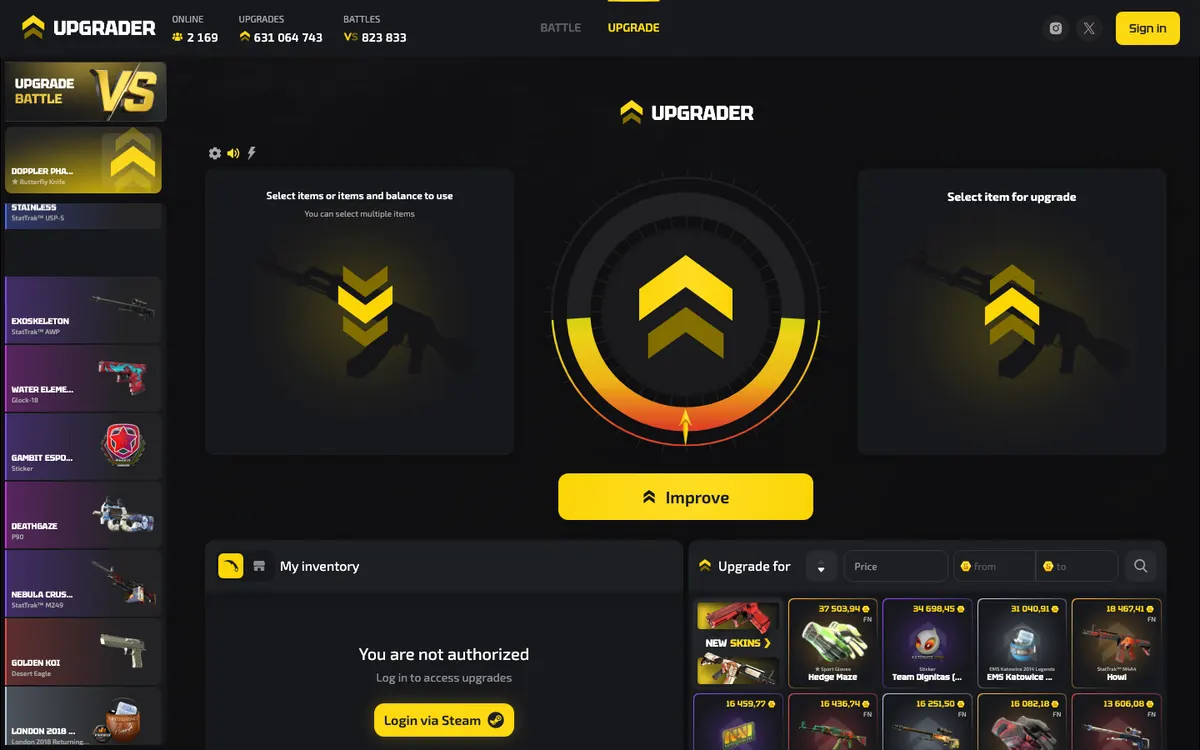
Upgrade: understand the target and what you put at stake
In general skin-upgrade terminology, an upgrade is a chance-based attempt to exchange committed value for a target item of greater displayed value. It is not a purchase with certain delivery of the target. Upgrader documents CS2 upgrades, but its mode description does not publish a complete input-to-outcome formula. The practical question is therefore not simply which item looks attractive: it is what you must commit, what result counts as success and what happens if the attempt fails.
An upgrade is not a repair or a Steam trade-up contract
The word upgrade can be misleading if you expect an existing skin to become less worn, change rarity or gain a special attribute. A third-party skin-upgrade game is conceptually different from modifying an item inside CS2. It is also distinct from the game's own trade-up contract system. Do not carry assumptions about eligible inputs or output collections from an in-game feature to a separate website. Treat the selected target as an item outcome governed by the site's displayed rules, rather than as a promised improvement to the skin already in your inventory.
- Identify the inputRead which item or balance the attempt would commit. Separate the name of the item from the value assigned to it. If the interface does not make clear what leaves your available inventory or balance, stop before confirming.
- Inspect the precise targetCheck the target's full description rather than relying on its image. The finish, wear category and special attributes can distinguish similar-looking items. A displayed value is not a promise that another market will pay the same amount.
- Read the probability and failure rule togetherA success chance is incomplete without the consequence of failure. Establish whether the committed value is lost and whether any alternative result applies. Never assume a refund, consolation item or recovery mechanism unless the current rules explicitly provide it.
- Review the final stateChanging an input or target may change the terms of the attempt. Re-read the final selection rather than relying on an earlier screen. Only proceed if the whole committed value is affordable to lose; otherwise, leave the attempt unconfirmed.
Why wear, rarity and valuation matter
For CS2 skins, rarity describes an item category, while wear describes its condition. Float is the underlying wear value; pattern and special attributes can also distinguish items with similar names. None of these concepts is a standalone promise of market value or easy resale. A rare item is not automatically the item you intended to receive, and a familiar image may represent a different wear category. Compare the complete item description wherever an input, target or withdrawal is shown. The skin terminology glossary explains these distinctions without treating them as Upgrader-specific pricing rules.
Compare the whole commitment, not just the target
If you compare possible upgrade attempts, use a consistent basis: the precise input, its assigned value, the target description, the displayed chance and the failure consequence. Looking only at the target can hide how much of your inventory the attempt would consume. Looking only at the chance can hide an unwanted or differently valued target. Keep the source of the stake out of that comparison: an item received earlier still has value, and using it in another attempt is a new decision to put it at risk. Likewise, the amount you originally paid for a skin does not determine the terms currently offered for it. This is a general decision method, not a claim about Upgrader's pricing algorithm. If any part of the proposed operation changes, compare the final terms afresh rather than treating the earlier selection as binding.
Battles: separate the opponent from the settlement rules
Upgrader's Battles page lists 2-player matches and lets users create, join or watch them. That establishes an opponent-based format, but not every detail of how a match resolves. The word battle does not tell you whether results are compared by item value, another score or a separate calculation. It also does not establish that the winner receives everything, that draws are refunded or that an unfilled match can always be cancelled. Those conditions need to be clear before entry.
Creating, joining and watching serve different purposes
Creating a battle means starting a match through the available creation option. It does not establish which settings the creator can change. Before confirming, identify the entry commitment and any rule governing a match that has not found an opponent. Do not assume that being the creator gives control over randomness or an advantage in the result.
Joining means entering an existing match, so the important task is to inspect its conditions rather than rely on the lobby label. Compare the commitment, the outcome calculation and the settlement terms with what you expected. A familiar opponent name, an appealing item picture or a short waiting time says nothing about the fairness or affordability of the match.
Watching can help you understand how a battle is presented before deciding whether to participate. It is not evidence of a separate demo mode, and a watched result does not establish your future odds. A run of impressive outcomes can make a format feel more generous than its underlying rules justify. Use observation to identify questions about settlement, not to forecast the next match.
- Entry commitment: which items or balance become unavailable when you create or join?
- Match start: what triggers play, and what happens while the other position is unfilled?
- Result calculation: which outcomes are compared, and how is the winner determined?
- Settlement: what does each participant receive after the result, including any losing outcome?
- Exceptional cases: how are ties, disconnections, interrupted displays and cancelled matches handled?
- Record access: where can you find the match identifier and any result details needed to question a settlement?
These are decision criteria, not a description of features Upgrader necessarily provides. If a condition material to your decision is unclear, leave the match unentered. Having another player involved does not remove the house edge from a chance-based format, and it does not turn uncertain item outcomes into a test of CS2 playing ability.
Clarify ties and how results are compared
A battle has separate questions about generating each outcome and comparing the outcomes afterward. Understanding the random result alone does not tell you who should receive the match settlement. In a value-based contest, if that is what the current rules describe, establish which valuation is used and whether the displayed figures have the same precision as the settlement calculation. Similar-looking totals do not explain a tie rule. In a score-based contest, establish what contributes to the score and whether any special condition changes the comparison. These are general checks, not claims that Upgrader uses either system. Read exception rules before they become relevant: do not assume that an equal result means a refund, another round or a shared award. A clear normal outcome cannot compensate for an unclear tie condition.
Crash, roulette and case battles: avoid mixing up formats
Searches for Upgrader crash or Upgrader roulette do not establish that those games are available. Neither appears in the documented mode selection. The following comparison explains general market terminology so you can recognise the differences without attributing another site's mechanics to Upgrader. All chance-based examples are 18+ and carry a house edge.
| Format | Typical central decision | What distinguishes it |
|---|---|---|
| Skin upgrade | Select committed value and a target outcome | Focuses on whether an item-upgrade attempt succeeds under the displayed probability rules |
| Battle | Enter a match under shared conditions | Adds participant comparison and a separate match-settlement question; exact mechanics vary |
| Crash | Choose when to exit a rising displayed multiplier | A crash ends the opportunity to exit that round; exact payout and exit rules depend on the operator |
| Roulette | Choose an outcome category before a result is generated | Settlement depends on the chosen category, its probability and its payout |
| Case battle | Enter a contest involving case-opening outcomes | Requires explicit case and scoring rules; a page called Battles alone does not establish this format |
Presentation is not enough to identify the game. A spinning wheel may simply animate an upgrade result, while a lobby may show battles without involving cases. Read the action being authorised and the rule that determines settlement. If the screen does not match the mode you intended to use, do not improvise based on visual similarity or terminology learned elsewhere.
Read the chance, value and house edge together
A probability tells you how often an outcome is expected across many comparable attempts; it does not schedule your next success. A target's displayed value tells you how the platform values that item for the transaction; it does not establish what you could receive elsewhere. A payout rule tells you what a successful outcome returns. You need these pieces together to understand the proposition, not just the most attractive number on the screen.
A house edge is different from a transaction fee
The house edge is the operator's mathematical advantage embedded in the relationship between probabilities and returns. A transaction fee is a separate charge, where one applies. A mode can carry a house edge without displaying a distinct fee for each attempt. Upgrader's published mode descriptions do not specify a numerical house edge or complete payout formula, so no exact cost calculation follows from the mode names alone. For the distinction between item pricing and explicit charges, see the Upgrader fees guide.
Streaks do not create a recovery strategy
Where rounds are independent, earlier results do not make the next favourable result due. Increasing the stake after a loss changes your exposure, not that mathematical principle. Switching from Upgrade to Battles also does not erase what you have already spent. A mode change can make a session feel new while the same budget continues to shrink. Set the stopping decision before playing, and do not reinterpret a sequence of losses as information that a better result must be close.
What provably fair verification would need to show
Provably fair is a verification concept, not a promise of favourable outcomes. In a typical implementation, an operator commits to secret information through a cryptographic hash before play, then reveals information that lets the user reproduce the result. A client seed and a round counter may also be involved. These are general principles, not a claim that Upgrader publishes a particular seed system, algorithm or verifier.
A meaningful check needs more than a hash displayed after a match. You need the original commitment, the required inputs, the calculation method and the mapping from the generated result to the actual outcome. For an upgrade, that includes how the result falls inside or outside the success range. For a battle, it includes the relevant outcomes and the rule comparing them. Reproducing a result can establish consistency with a disclosed procedure; it does not remove the house edge, validate item prices or guarantee withdrawal. The provably fair guide explains how to assess those separate questions.
Keep verification evidence attached to the exact operation being checked. A worked example or another user's successful calculation does not verify your own upgrade or battle. Where a verification system provides identifiers and inputs, record which commitment belongs to which result and preserve the applicable rules. If a calculation does not match, first check for a mismatched round, an incorrectly copied value or a different outcome-mapping procedure. A mismatch deserves clarification, but incomplete inputs alone do not establish manipulation. Equally, being unable to reproduce a result is not a reason to accept a fairness label without further explanation.
Steam access and item delivery are separate from the game result
Upgrader uses Steam login for access to upgrades. Its terms also cover an Internal Balance and the receipt, storage, exchange and withdrawal of items. These are different stages: signing in establishes access, a mode resolves an operation, and withdrawal concerns delivery outside the site's inventory. A result shown on a website should not be confused with a completed Steam trade. Steam sign-in is not Valve endorsement; Upgrader's terms expressly state that the platform is not affiliated with or controlled by Valve or Steam.
- Check the sign-in destination before entering Steam credentials. A familiar logo or profile picture does not establish that the page is genuine.
- Understand the purpose of a trade link: it enables trade offers to reach the relevant account, but it is not permission to approve every offer you receive.
- Inspect both sides of a Steam trade offer. Valve describes offers as prepackaged trades containing the items selected for each side.
- Use Steam Guard confirmations carefully. The Mobile Authenticator provides two-factor authentication for trade and market confirmations; approval still requires checking the transaction itself.
- Distinguish a Steam trade hold from a game result. A hold means Steam keeps items for a period before delivery, allowing compromised-account owners an opportunity to cancel fraudulent trades.
These are Steam-level concepts, not a published list of Upgrader withdrawal requirements. Do not infer a delivery time, hold exemption or supported withdrawal route from them. Also distinguish a site's internal item valuation from the Steam Community Market, where transactions use Steam Wallet funds and the purchase interface displays fee lines. If your objective is receiving a specific skin rather than taking a chance, resolve the delivery question first using the deposit and withdrawal guide and trade-safety checklist.
Resolve an unclear result without adding another stake
The following are troubleshooting scenarios, not reports of known Upgrader faults. The common principle is to preserve the transaction state before doing anything that could create another commitment. An animation, a loading screen and an account record can answer different questions; do not repeat an action merely to see whether the display changes.
The upgrade selection changed
If the target, assigned value or displayed chance changes before confirmation, review the entire proposed operation again. Do not use an earlier screenshot as evidence of the terms currently being offered. If a change appears after submission, preserve both the selection details and the resulting record rather than making another attempt to test it.
A battle has not started
First distinguish waiting for an opponent from an operation that already began. Read the current match status and any cancellation conditions. Do not assume a second click is harmless or that leaving the page cancels participation. If the commitment is unclear, keep the match identifier and ask for clarification before entering another battle.
The animation and record seem inconsistent
Save the available result details, the item names, the time and any operation or match identifier. Look for a settled record rather than judging solely from where an animation appeared to stop. Request an explanation of the recorded outcome; do not assume either that the display guarantees a particular award or that another attempt will correct it.
The item is shown on-site but not in Steam
Separate the game outcome from the withdrawal stage. Check whether a withdrawal was actually requested, whether a Steam offer exists and whether Steam shows a hold or other status. Do not approve an unrelated offer as a supposed repair step. Keep sensitive credentials and confirmation codes out of screenshots shared when asking for help.
A connection failure deserves the same caution. Losing the page does not, by itself, tell you whether an operation reached the server, whether a match started or whether settlement completed. Restore access and inspect the existing operation before attempting a replacement. Do not assume that refreshing cancels a stake, and do not submit again just because a confirmation was not visible. If the account state remains ambiguous, stop and request clarification with the approximate time and any identifier already available. This approach avoids turning a display problem into a potentially separate commitment; it does not imply that Upgrader has a particular automatic-retry or refund policy.
A useful support request describes the mode, the expected result under the displayed rule, the recorded result and the relevant identifier. Keep the explanation factual and include only necessary account information. The support guide covers what to prepare without assuming a particular response time or promising that a disputed operation will be reversed.
Choose based on your goal—not the animation
If you want to understand an individual target attempt, Upgrade is the relevant documented category. If you want to understand an opponent-based match, Battles is the relevant category, with watching available as an observation option. If you need certainty of receiving a particular item, neither chance-based format supplies that certainty. A direct purchase of a known item is conceptually different from an upgrade attempt; this distinction does not establish that Upgrader operates a marketplace.
Eligibility comes before mode selection. Treat chance-based skin games as 18+ and check the law where you are located; Upgrader's terms allow territorial, age-related and other restrictions. Tradable items are not without value merely because they are digital: the UK Gambling Commission explains that items convertible to cash or other valuable items can constitute money or money's worth. That general regulatory principle is not a statement about Upgrader's licensing status.
Set a spending boundary and a stopping point before committing anything, counting skins as part of that boundary rather than as spare inventory. Stop if you are trying to recover a previous loss, concealing spending or finding it difficult to leave a session. Changing modes is not a substitute for stopping. The responsible-gambling guide provides further guidance on recognising harm and seeking help.
Quick checklist before choosing a mode
- Identify the actual format: Upgrader documents Upgrade and 2-player Battles, not crash or roulette.
- Know the complete commitment, including the exact item or balance used and the consequence of losing.
- Read the target or match conditions, including settlement and any cancellation or tie rules.
- Keep fairness verification, platform pricing and Steam delivery as separate checks.
- Confirm that participation is lawful for you and apply an adult-only approach to chance-based modes.
- Leave without committing if a material rule is unclear or losing the stake would cause difficulty.
Upgrader game modes FAQ
No matching questions found.
What game modes does Upgrader have?
How does the Upgrader upgrade mode work?
How many players are in an Upgrader Battle?
Are Upgrader Battles the same as case battles?
Does Upgrader offer crash or roulette?
Can I watch an Upgrader Battle before entering one?
What are Upgrader's upgrade odds and house edge?
Are Upgrader games provably fair?
Does a successful result mean the skin is already in my Steam inventory?
This independent guide is for informational purposes and is not affiliated with Upgrader.